
Manual data entry can consume hours when businesses need to transfer information from invoices, sales orders, receipts and forms into their systems. As records increase, the time spent entering and checking information can delay other work.
Automated data entry software can reduce repetitive work, but faster processing does not always mean accurate records. The result still depends on the source documents, software configuration and checks used to identify errors.
For Australian businesses, choosing between manual and automated data entry means weighing processing costs, record accuracy and the ability to handle changing workloads. This guide compares both methods, explains common manual data entry challenges and shows how businesses can choose an approach that supports their operations.
Key takeaways
- Manual data entry offers flexibility when records need interpretation, but labour and review costs can increase with transaction volumes.
- Automated data entry reduces repetitive typing, although incorrect extraction and poor configuration can still affect record accuracy.
- Data-entry errors can lead to correction costs, delayed payments, inaccurate reports and potential compliance consequences.
- Combining automation with professional review can help businesses process routine records while maintaining control over exceptions.
- Outsourced data entry provides additional processing capacity and access to experienced professionals without requiring every task to be handled internally.
Manual vs Automated Data Entry: What are the key differences?
Manual data entry relies on people to read, interpret and record information, while automated data entry uses software to extract and transfer data. The practical differences become clearer when comparing their effects on accuracy, speed, cost, flexibility and business growth.
1. Accuracy: How reliable are the records?
Manual Data Entry
Accuracy is essential in data entry because even a small mistake can affect financial records, customer information or business decisions. When employees enter details manually, they must rely on their concentration and attention to detail throughout the process.
Fatigue, repetitive tasks or misreading figures can lead to incorrect amounts, duplicate entries or information recorded against the wrong account.
Reviewing records helps catch these errors, but a mistake can still go unnoticed if the person checking the entry overlooks it as well. Maintaining accuracy therefore requires clear procedures, careful checking and enough time to review records properly.
Automated Data Entry
Using automation can reduce errors caused by manual typing and apply consistent rules across large volumes of records. This makes it useful for repetitive tasks where information follows a predictable format.
However, automated processing does not guarantee accurate results. Poor-quality documents, incorrect field mapping or misread figures can introduce errors that may go unnoticed if the system lacks suitable validation checks.
Unlike a person, software may not recognise that a figure looks unusual unless the relevant rules are configured. Automation can improve consistency, but human review remains important for discrepancies and records that need closer examination.
2. Speed: How quickly can records be processed?
Manual Data Entry
Entering records one by one takes time, particularly when employees must switch between documents and business systems to transfer information. Processing becomes slower when records contain missing details or require clarification before entry.
During busy periods, employees may struggle to keep up with incoming documents, creating backlogs that delay invoicing, order fulfilment or reporting. Additional staff can increase processing capacity, but recruitment, training and supervision also take time.
Automated Data Entry
When businesses process large volumes of invoices, purchase orders or customer forms, batch processing allows multiple documents to be processed in one operation rather than handled individually.
Combined with OCR and automated field extraction, this reduces repetitive work and allows employees to focus on queries and records that need closer review.
However, the time saved depends on document quality and how much of the workflow can be automated. Missing information, unreadable text and extraction errors still require attention, so automated exception routing and review queues can help prevent unresolved records from delaying the entire process.
3. Cost: What does each method really cost?
Manual Data Entry
The main costs are staff wages, training and record checks. Businesses do not need to pay for specialised software or system setup, which can make it a practical option for handling small volumes of records.
However, skipping checks to save time can lead to errors in invoices, payments or tax records. Correcting these mistakes takes extra time and money, while some errors may also result in penalties or damage to customer trust. Over time, these costs can become higher than the money saved on software, especially when businesses process large volumes of records.
Automated Data Entry
Automation requires an initial investment in software, setup, system integration and staff training. Subscription and maintenance fees may also apply. However, automation can reduce the time spent entering records and correcting mistakes.
These savings can help cover the initial cost over time, particularly for businesses processing large volumes of records. Automation can still make mistakes if information is read incorrectly or the system is set up poorly, so regular checks remain important. The long-term savings depend on the cost of the software, the amount of work it reduces and the effort needed to correct errors.
4. Flexibility: How well can each method handle different documents?
Manual Data Entry
When documents vary in layout or contain unusual information, employees can interpret the details in context and decide what needs clarification.
For example, a supplier invoice may combine several charges that need to be checked against the original purchase order. An employee can investigate the difference before recording the transaction.
However, handling unfamiliar documents takes additional time, and inconsistent judgement can affect how similar records are entered. Clear procedures help reduce these differences, but varied documents still require attention.
Automated Data Entry
Different document formats can be processed automatically when the system supports their layouts and identifies the required fields correctly.
This reduces repetitive work across supported formats, but a change in an invoice layout can cause information to be missed or assigned incorrectly. The business may need to update the configuration, test the revised process and review affected records.
Automation is more effective when document formats are predictable or adequately supported, while manual intervention remains useful for unusual documents that require interpretation.
5. Scalability: Can the process keep up with business growth?
Manual Data Entry
As transaction volumes increase, employees need more time to process the additional records. Businesses may have to extend working hours, redistribute tasks or recruit more staff to prevent backlogs.
These measures can increase labour costs and create additional training and supervision requirements. Although a larger team can handle more work, maintaining consistent accuracy becomes harder if procedures and review capacity do not keep pace with growth.
Automated Data Entry
Higher volumes of routine records can be processed without a proportional increase in manual entry hours, giving businesses more capacity during expansion or seasonal peaks. However, processing more documents can also generate more exceptions that need human review.
If the team cannot resolve these cases quickly enough, delays may simply shift from data entry to the review stage. Successful scaling therefore requires reliable processing, suitable validation rules and sufficient capacity to investigate and correct exceptions.
Whichever method a business uses, the errors that reach its financial records usually begin at the point of entry.
What challenges does Manual Data Entry create?
Manual data entry can create problems beyond the original entry when incorrect, incomplete or delayed records affect other business processes. Identifying common mistakes helps businesses understand where controls can reduce financial and operational risks.
The most common manual data entry errors in accounting include:
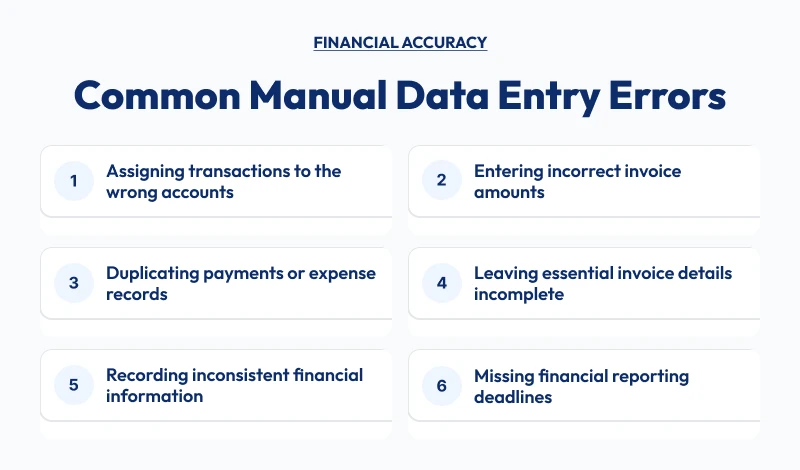
Preventing these errors requires clear procedures and regular checks. Businesses can use the following controls to reduce mistakes and keep financial records accurate.
What controls can help prevent these mistakes?
Businesses can reduce manual data-entry errors by setting clear procedures, checking important fields and assigning responsibility for reviewing exceptions. The right controls depend on the records being processed and the consequences of an error.
| Control | How it helps |
|---|---|
| Standard data-entry instructions | Reduces differences in how employees record similar transactions |
| Validation of key fields | Helps identify missing details and incorrect values before records are finalised |
| Duplicate checks | Flags records with matching references or other identifying information |
| Source-document verification | Helps confirm amounts, dates and account details against the original record |
| Defined review responsibilities | Ensures exceptions are assigned to someone who can investigate them |
| Deadline tracking | Helps teams prioritise records that affect payments, reporting or other time-sensitive tasks |
These controls improve the reliability of manual processing, but they require time and consistent application. When the volume of records grows beyond the team’s capacity, businesses may need automation, and the right tool depends on the type of record being processed.
What types of Data Entry Automation are available?
Data entry automation covers several technologies, and each suits a different kind of record. Matching the tool to the document matters more than choosing the most advanced option.
| Type | What it does | Best suited to | Main limitation |
|---|---|---|---|
| OCR (optical character recognition) | Converts scanned or photographed documents into readable text | Printed invoices and receipts with a clear layout | Struggles with poor scans, handwriting and unusual layouts |
| Template-based extraction | Reads fixed fields from documents with a known layout | Regular suppliers who send invoices in the same format | Becomes inaccurate when a supplier changes the layout |
| AI-based document processing | Finds fields across varied layouts and suggests values | Mixed invoices, receipts and forms from many sources | Needs testing and review of low-confidence results |
| Robotic process automation (RPA) | Copies data between systems by following defined rules | Moving approved records from one system to another | Cannot interpret data, so one faulty rule repeats across every record |
| Direct integrations and e-invoicing | Passes structured data between systems without extraction | Suppliers and software that support direct connections, including Peppol e-invoicing | Works only when both sides support the connection |
Many businesses combine more than one type, such as OCR to read supplier invoices and RPA to move approved records into accounting software. Each tool reads data, but none can judge whether a record is correct.
What can Data Entry Automation handle and where is Human Review needed?
Automation is most useful for repeatable tasks with identifiable fields, while human review remains important when records contain uncertainty or require a decision. The following comparison shows how responsibilities can be divided:
| Data-entry task | What automation can handle | Where human review is needed |
|---|---|---|
| Invoice processing | Extract supplier details, invoice references, dates and totals | Investigate mismatched orders, unclear amounts and missing information |
| Receipt processing | Capture transaction dates, available details and amounts | Check incomplete documents or information that cannot be read reliably |
| Sales orders and forms | Transfer standard fields into business systems | Resolve conflicting customer details or incomplete orders |
| Customer and supplier records | Populate fields from consistent source documents | Investigate possible duplicates and inconsistent records |
| Repetitive record updates | Apply defined rules across batches of records | Assess exceptions that fall outside those rules |
Software can flag records that fail validation, but identifying a discrepancy does not necessarily explain its cause. For example, two invoices with similar references and amounts may be duplicates, or they may relate to separate purchases. A person must check the supporting records before deciding what action to take.
When does a Hybrid Data Entry Approach make sense?
A hybrid approach works well when businesses process large volumes of routine records but need human judgement for exceptions. Software handles repetitive data capture, while employees verify discrepancies and resolve complex cases.
For example, automation can extract invoice details and flag mismatches with purchase orders. An employee can investigate the discrepancies and confirm the correct information before finalising the records.
To make this approach effective, businesses need clear validation rules, defined review responsibilities and a process for resolving exceptions. Manual checks on every field can reduce the time saved through automation, while relying entirely on software can allow errors to pass unnoticed.
How do you decide which approach suits your Business?
The decision rests on four factors: monthly record volume, document variety, the cost of an error and the capacity to review exceptions. The table matches common situations to a starting point.
| If this describes your business | Suitable starting point |
|---|---|
| Low volumes and varied documents | Manual entry with a standard checklist and a second check |
| High volumes in predictable formats | Automation with validation rules and an exception queue |
| High volumes with frequent exceptions | Hybrid approach with defined review responsibilities |
| Sharp rises in volume during busy periods | Outsourced capacity, with or without automation |
A sole trader with 30 receipts a month can record them manually without adding a software expense. For a Pty Ltd wholesaler receiving 600 invoices in 20 different formats, manual entry takes considerably more effort. Invoice extraction software can capture the details and flag duplicates, allowing staff to focus on checking errors rather than typing every invoice.
Local requirements can also change which option is practical for an Australian business.
What should Australian Businesses check before choosing an approach?
Australian businesses should confirm software compatibility, e-invoicing support, privacy obligations, record retention and local data formats. These checks apply whether the work is done internally, by software or by an external team.
- Accounting software: Confirm that any extraction tool or outsourced team works with Xero, MYOB, QuickBooks Online or your current system.
- E-invoicing: Australia uses the Peppol network. Invoices sent this way arrive as structured data, so no extraction is needed.
- Privacy: Invoices and forms often contain personal information. The Privacy Act 1988 and the Australian Privacy Principles require covered organisations to take reasonable steps to protect it, including when data is stored or processed overseas.
- Record retention: The Corporations Act 2001 requires companies to keep financial records for seven years, stored so they can be found and read.
- Local formats: Check that the system reads dates as DD/MM/YYYY, handles Australian dollar amounts and validates 11-digit ABNs.
A tool built for another market can handle these details poorly, so test it on your own documents before committing.
These checks matter most when an external team holds the business’s records.
How can Outsourced Data Entry support your Business?
Outsourced data entry gives businesses extra processing capacity without requiring them to recruit and train additional staff. It can help manage backlogs, seasonal workloads and repetitive tasks.
An external team can enter records, check information and flag discrepancies using agreed procedures. This frees internal employees to focus on approvals, reconciliations and customer queries.
Results depend on the provider’s expertise, quality checks, data security and understanding of the business’s requirements. Depending on the arrangement, outsourced teams can handle manual entry, work with existing software or support automated workflows.
How Does Outbooks support Data Entry?
Outbooks supports businesses and accounting practices with outsourced accounting and bookkeeping processes, helping teams manage workloads that would otherwise require additional internal staff time.
For businesses dealing with recurring records and data-processing tasks, outsourced support can provide additional capacity for routine work while internal teams retain oversight of important decisions and approvals. This can help reduce pressure on employees who need to balance record processing with reconciliations, reporting and other operational responsibilities.
The appropriate support depends on the type of records, existing workflow and volume of work. Businesses should discuss their specific data-entry requirements to establish which tasks can be supported and how the work can be incorporated into their current processes.
Book a consultation now to discuss your data-entry requirements with Outbooks. You can also email info@outbooks.com to enquire about available support.
Conclusion
Manual data entry provides flexibility when records need interpretation, but labour, review and correction costs can increase as workloads grow. Automation reduces repetitive work and supports higher processing volumes, although software quality and exception handling remain important.
For many businesses, the most practical approach combines efficient data capture with professional review. The right balance helps reduce avoidable work, protect record quality and give employees more time to focus on tasks that require judgement.
Frequently Asked Questions
Is automated data entry always more accurate than manual data entry?
No, accuracy depends on the source documents, software configuration and review process. Automation reduces some typing errors, but it can still extract incorrect information or miss details that require human judgement.
Can small businesses benefit from data entry automation?
Yes, small businesses can benefit when recurring data-entry tasks consume significant staff time. The financial benefit depends on transaction volumes, software costs and how much manual work automation removes.
Does automation remove the need for data-entry professionals?
No, employees may still need to investigate discrepancies, verify uncertain records and manage exceptions. Automation can reduce repetitive work, allowing professionals to focus on tasks that require judgement.
When should a business outsource data entry?
A business may consider outsourcing when backlogs persist, internal staff lack processing capacity or routine entry takes time away from higher-priority work. Access to experienced professionals can also help when consistent procedures and additional review capacity are needed.
Can outsourced data entry work with existing business software?
Yes, external teams may be able to work within existing systems, depending on the provider’s capabilities, software access and agreed workflow. Businesses should confirm compatibility, data access arrangements and review responsibilities before work begins.