
What if your business paid the same invoice twice without realising it? Or worse, what if a supplier payment was redirected to a scammer?
These risks can arise when invoices are processed through different channels, supplier details are not properly checked or payment changes are approved without independent verification. As invoice volumes grow, a single missed check can result in financial loss and additional work to trace and correct the payment.
This guide explains how duplicate payments and invoice fraud happen, the warning signs to look for and the accounts payable controls that can help stop an incorrect or fraudulent payment before it is released.
Key takeaways
- Australian businesses and accounting firms face invoice fraud risks when supplier details are not verified.
- Duplicate payments and invoice fraud usually exploit the same control gaps fixing one improves the other.
- AP automation can help identify duplicate invoices and streamline approval workflows, but human verification is still needed for supplier and payment-detail changes.
- Regular supplier-master reviews can identify duplicate, outdated or suspicious supplier records before they create payment problems.
- Segregation of duties, invoice matching and vendor verification catch most fraud and duplicate payments before money leaves the business.
- Outsourced accounts payable processing adds a second layer of review without replacing internal oversight.
What is Invoice Fraud in Accounts Payable?
Invoice fraud occurs when a business makes an unauthorised payment because an invoice or supplier record has been deliberately manipulated. The result can be a direct financial loss, overpayment or payment to an account controlled by a fraudster.
Common types of Invoice Fraud
Invoice fraud can take different forms, so the right checks depend on how the fraud is carried out. Some schemes involve completely false invoices, while others use genuine supplier information and change one part of the payment process.
| Type | How it works | What to check |
|---|---|---|
| Fake supplier invoice | An invoice is submitted by a supplier the business has not approved or used | Check the supplier against approved records and supporting purchase documents |
| Duplicate invoice | An invoice is submitted again, sometimes with a different reference number or date | Compare supplier, amount, date, reference number and line items with previous invoices |
| Invoice padding | Quantities, prices or additional charges are higher than agreed | Match the invoice with the purchase order, contract or delivery record |
| Payment redirection | Genuine supplier payment details are replaced with different bank details | Confirm any BSB and account number change using existing supplier contact details |
Payment redirection is particularly relevant to Australian businesses because scammers can impersonate an existing supplier and request a change to payment details. Scamwatch advises businesses to independently contact the supplier before making payment to changed payee details.
Invoice Fraud vs. Duplicate Payments What’s the difference?
Both can result in an incorrect payment, but they require different checks from AP teams and different levels of oversight from the business.
| Aspect | Duplicate Payment | Invoice Fraud |
|---|---|---|
| What happens? | A legitimate invoice is paid more than once. | A false or manipulated invoice results in an unauthorised payment. |
| Why does it happen? | Duplicate entry, multiple invoice channels or missed payment matching. | Fake invoices, altered amounts, fake suppliers or changed bank details. |
| Business impact | Cash is unnecessarily paid out and must be recovered or reconciled. | Money may be paid to a fraudster and can be difficult to recover. |
| What should AP check? | Invoice number, supplier, amount, date and previous payments. | Supplier details, invoice legitimacy, approval and any changes to payment details. |
| What should the business oversee? | Controls that prevent duplicate processing and ensure payments are reconciled. | Supplier verification, segregation of duties and independent approval of high-risk changes. |
The two risks can overlap. A fraudulent invoice can also be submitted more than once, so AP teams need duplicate-payment checks alongside fraud controls. For businesses, having both controls in place reduces the chance that an incorrect payment reaches the bank before anyone identifies it.
The Risks: What this costs Accounting Firms and Businesses?
The impact of AP fraud and payment errors goes beyond the amount paid incorrectly. The three main costs are financial exposure, time spent investigating and correcting the issue and disruption to normal AP operations. For businesses, these costs can affect cash flow and supplier relationships. For accounting firms, they can add work to client accounts and require further review of the underlying records.
The impact can vary depending on how the issue occurs and how quickly it is identified. The following areas show where the risk can affect the business or accounting firm.
Financial and cash flow impact
Duplicate payments and invoice fraud can both reduce available cash before the issue is identified. A duplicate payment means the business has paid more than it owes and may need to recover the excess from the supplier. For example, paying the same $12,500 equipment invoice twice leaves $12,500 that needs to be recovered or reconciled.
Payment redirection creates a different risk because the money may go directly to an unauthorised account. In 2025, Australia reported $166.8 million in losses from payment redirection scams, according to the National Anti-Scam Centre.
Audit and compliance exposure
AP transactions need supporting records that show what was purchased, who approved it and why the payment was released. Missing purchase orders, unclear approval records or unexplained supplier changes can lead to additional questions during an audit and make transactions harder to verify.
For example, an $18,000 invoice may have been paid correctly, but without an approval record there is no clear evidence that the expense was authorised. A business may need to trace internal records, while an accounting firm may need to obtain supporting documents from the client before the transaction can be properly supported.
Reputational and vendor relationship risk
Payment errors can affect supplier relationships when overpayments need to be recovered or genuine invoices remain unpaid because funds were redirected.
For businesses, resolving the issue can involve supplier communication and payment corrections. For accounting firms, an AP issue in a client’s accounts can create additional checking and explanation work when the records do not clearly show what happened.
Operational risk from manual processes
A manual accounts payable process, where invoices are entered by hand and checked from memory, is where most of this risk concentrates. The more invoices a business or firm processes without a consistent system, the more likely a duplicate or fraudulent invoice gets through unnoticed.
For example, an invoice submitted by email may be entered into the accounting system before a second copy submitted through the supplier portal is reviewed. Without a central intake process or duplicate check, both payments can move forward.
How to detect Invoice Fraud and Duplicate Payments?
The safest point to identify a suspicious payment is before it is released. Businesses and accounting firms handling client payments should confirm that the payment is going to the right supplier, relates to a genuine purchase and has not already been processed.
For businesses, these checks can be built into the internal accounts payable workflow. For accounting firms, the same controls can be applied when reviewing and processing payments on behalf of clients.
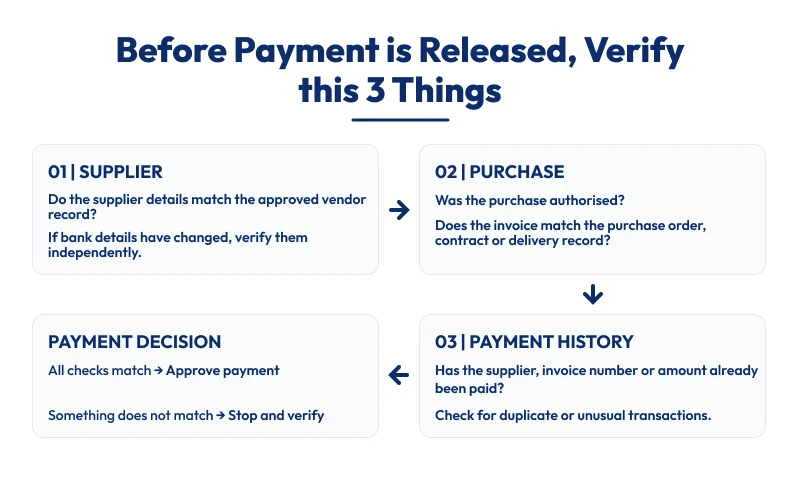
These checks give businesses and accounting firms a consistent way to identify issues before they become payment errors or fraud. The supplier check needs particular attention when bank details change, as payment redirection can involve genuine invoices and familiar supplier information.
The requested BSB and account number should be checked against the existing supplier record. If the details differ, verify the change independently using contact details already held by the business or accounting firm before updating the supplier record.
Red flags to watch for:
A few signals are worth checking every time:
- Supplier email has changed: Check for small spelling or domain changes compared with earlier supplier emails.
- BSB or account number has changed: Confirm the new details using contact information already held in the supplier record.
- Invoice resembles an earlier payment: Compare the supplier, amount, date, reference number and line items.
- Payment suddenly becomes urgent: Compare the request with the supplier’s usual payment terms before approving it.
- Invoice does not match the purchase: Check quantities, rates, descriptions and additional charges against the purchase order or other supporting records.
- New supplier has limited records: Confirm supplier approval, business details and supporting purchase documents before payment.
One unusual detail may have a legitimate explanation. Several changes affecting the same payment require closer review.
For example, a supplier that normally uses the same accounts contact and 30-day terms suddenly requests same-day payment to a new BSB and account number. The change should be verified through an existing supplier contact before the payment is approved.
What to do if you spot one:
If suspicious activity is identified:
- Stop the payment if it has not been released.
- Contact the bank immediately if funds have already been transferred.
- Contact the genuine supplier using existing contact details.
- Secure affected accounts if email access may have been compromised.
- Report the incident to Scamwatch or ReportCyber where appropriate.
- Keep the evidence, including invoices, emails, payment records and supplier communications.
Strategies for Accounts Payable Fraud Prevention
Accounts payable fraud prevention works best when controls are built into each stage of the AP process.
Supplier setup, invoice review, approval and payment should each have defined checks so that one person or one missed step does not determine whether a payment goes through.
Segregation of duties and approval controls
No one person should be able to add a vendor, approve an invoice and release payment.
Where possible, supplier creation, invoice approval and payment release should be handled by different people.
This reduces the risk of one person controlling the full transaction.
Approval limits should also reflect the value of the purchase. A routine software subscription may need one approval, while a large equipment purchase may require additional authorisation.
Invoice matching and vendor verification
| Matching type | What it checks | Best suited to |
|---|---|---|
| Two-way matching | Invoice against purchase order | Standard purchases with a purchase order already raised |
| Three-way matching | Invoice against purchase order and delivery record | Higher-value purchases or goods received in stages |
Invoice matching should be paired with an independent check for any supplier bank detail change. Confirm the new details using a phone number already held in the vendor record, rather than the contact details provided on the invoice or email.
This extra step is especially important when AP teams are working under time pressure, as rushed approvals can leave less time to verify changes before payment is released.
Verify supplier bank changes separately
Bank detail changes need independent verification. Use contact information already held in the supplier record rather than the phone number or email provided with the change request. Record who confirmed the change, when it was confirmed and what information was verified.
Centralising invoice intake
When invoices can arrive by email, portal and post without a single point of entry, the same invoice can be processed twice through two different channels. Routing every invoice through one intake point, regardless of how it arrives, is what makes duplicate detection possible in the first place.
Staff training and awareness
The people processing invoices need to know which changes require further verification. Short, regular training can help staff recognise redirected payments, inflated charges and other unusual invoice activity that software may not identify on its own.
The AP procedure should also define who can approve supplier changes, how the supplier must be contacted and where the verification should be recorded.
Regular audits and vendor master hygiene
An internal audit at least once a year, plus a review of the supplier master file for duplicate or outdated supplier records, catches what day-to-day processing misses. Businesses processing a high volume of invoices should review vendor records more often, since that’s where duplicate accounts and stale details accumulate fastest.
How Outsourcing Accounts Payable strengthens these controls?
Outsourced accounts payable can give businesses and accounting firms an additional review point before invoices move to payment. The AP team can check supplier details, match invoices with supporting records and flag unusual transactions for approval.
For businesses, this can reduce the pressure on internal finance teams when invoice volumes increase. For accounting firms, outsourced support can help manage recurring AP work across several client accounts while keeping the same checks in place.
The scope remains focused on processing and review. Payment approval and decisions about supplier changes stay with the business or accounting firm. If a fraudulent payment is identified, the business or firm managing the client relationship remains responsible for the response and recovery process.
Outbooks Accounts Payable Services supports invoice processing, supplier management, purchase order matching, payment processing and account reconciliation. This can add AP capacity while keeping payment authority with the appropriate decision-maker.
Conclusion
Duplicate payments and invoice fraud can be reduced with consistent checks across supplier setup, invoice matching, approval and payment.
For businesses and accounting firms, defined AP controls make it easier to identify unusual transactions before payment and maintain supporting records when issues need to be reviewed.
If AP processing is taking too much time or your current controls need additional support, book a consultation with Outbooks or email info@outbooks.com to discuss your requirements.
FAQs
Can accounts payable automation fully prevent invoice fraud?
No system catches everything on its own. Automation is strong at catching duplicate invoice numbers and mismatched amounts, but a convincing payment redirection scam still needs a person to make the verification call.
How often should a business review its supplier master file?
At least twice a year for most small businesses and quarterly for anyone processing a high volume of invoices or onboarding new suppliers regularly.
Who is responsible if a business pays a fraudulent invoice?
The business that made the payment is generally responsible for the loss, since banks aren’t obliged to reverse a payment made to a fraudulent account. This is separate from any recovery support Scamwatch or ReportCyber can offer.
What size business needs a formal accounts payable fraud policy?
Any business processing invoices from more than a handful of suppliers benefits from a written policy. It gives staff a clear standard to follow rather than relying on individual judgement each time an invoice looks slightly off.
Are duplicate payments common even with accounting software?
Yes, software catches an exact duplicate invoice number, but an invoice resubmitted with a different reference or through a different channel can still slip through unless the process checks for that specifically.
What should be included in a report to the bank or Scamwatch?
The original and altered invoice, any correspondence showing the changed bank details, the payment confirmation and a timeline of when the change was noticed. Having these ready speeds up any recovery attempt.