

Setting up Xero correctly means configuring the chart of accounts, bank reconciliation, invoicing, user access and data migration in the right order, before transactions start flowing. Getting this sequence right the first time avoids costly rework later.
The quality of a Xero setup is determined by the decisions made before transactions start flowing. How the chart of accounts is structured, user access is assigned, migration data is verified and key settings are configured all affect how accurately the system supports your business.
This guide is written for Australian small business owners, finance managers and business decision-makers. It explains what to prepare before setting up Xero, the order each step should be completed and the common mistakes that can create unnecessary rework later.
Key Takeaways
- A Xero setup is not just a software task. The decisions made before the first transaction affect the accuracy of every report that follows.
- Customising Xero around how your business operates helps avoid misleading reports and unnecessary bookkeeping corrections later.
- Setting up bank feeds, user access and workflows correctly from the beginning reduces manual work as transaction volumes increase.
- Migrating to Xero without checking opening balances can carry past errors into future financial reporting.
- A well-structured Xero file gives business owners better visibility, while making it easier for bookkeepers and accountants to manage the accounts.
Before you start: What to have ready?
A Xero setup is much easier when the right information is prepared before you begin. Collecting key business records in advance reduces interruptions during setup and helps create a file that’s ready for everyday bookkeeping from day one.
Before opening Xero, have the following information available:
- Business details: Your registered business name and primary business contact details that will appear on invoices and other business documents.
- Financial records: Existing accounting data, spreadsheets or reports if you’re moving from another accounting system. Having these ready makes it easier to organise opening balances and compare historical information after migration.
- Bank account information: The business bank accounts you’ll use for customer payments, supplier payments and day-to-day transactions. These can be connected once the file structure has been finalised.
- Customer and supplier records: Contact names, email addresses and payment details. Importing these during setup is usually quicker than creating them individually as you begin trading in Xero.
- Employee information: If the business processes payroll in Xero, prepare employee details, pay rates, leave balances and superannuation information before adding staff to the system.
- Internal responsibilities: Decide who will raise invoices, enter supplier bills, reconcile bank transactions and review financial reports. Establishing these responsibilities before the setup helps determine user access and keeps day-to-day processes consistent.
Preparing these items first doesn’t just make the setup faster. It also reduces the likelihood of returning to change core settings after transactions have already started flowing through the system.
How to set up Xero for your Business in Australia?
Setting up Xero isn’t about completing seven software tasks. It’s about making a series of decisions that determine how easy the system will be to use six months from now. Businesses rarely rebuild a Xero file because the software is difficult. They rebuild it because decisions made during setup no longer support the way the business operates.
The sequence below focuses on those decisions, explaining not only what to do, but why each step comes before the next.
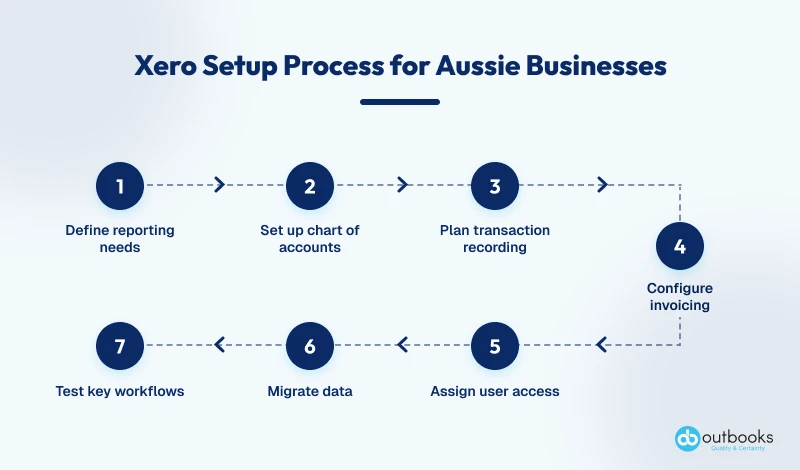
The sections below explain each step in detail, why it matters and how completing them in the right order helps create a Xero file that supports accurate bookkeeping and reliable reporting from the start.
Step 1: Decide how you want to manage the business before configuring Xero
Before entering data, decide what information the business should be able to produce every month. Think beyond standard financial reports and consider the questions management regularly asks.
For example, do you need to compare recurring work with project-based work? Do different locations or business units need to be reviewed separately? Do managers need visibility over specific cost areas?
These reporting requirements should shape the setup from the beginning. Businesses that configure Xero first and think about reporting later often discover that the information they need isn’t being captured consistently, making future reporting far more difficult than it needs to be.
Step 2: Build a chart of accounts that supports decisions, not just bookkeeping
The chart of accounts should make reports easier to understand, not add unnecessary bookkeeping work.
A common mistake is creating a new account for every expense type. This often leads to inconsistent coding and makes reports harder to interpret. However, grouping too many items together can remove the detail needed to track important business trends.
For example, separating recurring service income from one-off project revenue can help management understand revenue patterns. Creating separate accounts for every software subscription usually adds complexity without improving decision-making.
Before creating a new account, consider whether management will review that figure separately. If not, an existing category is usually enough.
Step 3: Agree how transactions will be recorded before connecting bank feeds
Bank feeds save time, but consistency matters more than speed. Before importing live transactions, decide how recurring income and expenses should be recorded and which transactions are suitable for reconciliation rules. This creates a consistent approach from the first reconciliation instead of relying on manual corrections later.
For example, office rent, insurance premiums and monthly software subscriptions usually follow the same coding pattern every month and are good candidates for automation. A supplier that invoices for different products or services throughout the year often benefits from manual review because the correct coding depends on what’s been purchased.
Automation should reduce decisions during bookkeeping, not create more of them.
Step 4: Configure invoices around the customer experience
Invoices are more than a record of payment. They’re part of how customers experience your business.
Before sending the first invoice, review branding, contact details, payment terms, invoice numbering and reminder settings. Making these decisions early helps present a consistent image and avoids updating templates after customers have already become familiar with them.
It’s a small step during setup, but one that’s much harder to standardise once invoicing becomes part of everyday operations.
Step 5: Define user responsibilities before assigning access
As businesses grow, more people begin interacting with the Xero file. Owners, office managers, finance teams and external bookkeepers rarely need the same level of access.
Instead of assigning broad permissions for convenience, decide who will create invoices, process supplier bills, reconcile transactions and review reports. Matching access to responsibilities helps protect important settings and makes it easier to understand who completed a particular task if questions arise later.
Clear responsibilities usually lead to more consistent bookkeeping than broad permissions ever do.
Step 6: Improve the quality of your data before migrating it
Migration is one of the few opportunities to improve financial records without interrupting day-to-day operations.
Before importing data, review duplicate contacts, inactive suppliers, unused accounts and outdated customer records. Carrying unnecessary information into a new system often means carrying old reporting problems forward as well.
For example, importing two versions of the same customer creates duplicate records that affect invoicing, reporting and account history until they’re manually merged. Cleaning those records before migration is significantly easier than correcting them after the business is operating in Xero.
Treat migration as a quality review, not simply a data transfer.
Step 7: Test everyday workflows before considering the setup complete
A Xero setup isn’t finished because every setting has been completed. It’s finished when everyday work can be carried out confidently.
Before going live, raise a customer invoice, enter a supplier bill, reconcile a sample of transactions and review the reports management expects to use each month. Testing complete workflows helps identify practical issues that individual settings don’t always reveal.
If routine tasks can be completed without changing the setup, the file is ready to support the business rather than requiring ongoing adjustments.
Where Xero setup errors originate?
Most Xero setup errors come from sequencing rather than missing steps. For example, connecting bank feeds before reconciliation rules exist or granting broad user access instead of role-based permissions can create issues that often go unnoticed until months of transactions have been processed.
The table below highlights the most common setup mistakes and where they typically show up later, making it easier to identify problems before they affect day-to-day bookkeeping and reporting.
| Setup mistake | Where it shows up later |
|---|---|
| Unmodified chart of accounts | Reports that don’t reflect how the business actually spends |
| No reconciliation rules before bank feeds go live | Inconsistent transaction coding across the ledger |
| Default invoice settings | Slower payment, inconsistent branding |
| Overly broad user permissions | Limited audit trail and difficult error tracking |
| Unchecked migration balances | Historical reporting that doesn’t tie out |
These issues rarely require rebuilding a Xero file immediately, but they often lead to ongoing corrections, inconsistent reporting and additional bookkeeping work over time. Identifying them early is far easier than fixing them after months of day-to-day transactions.
When professional Xero Setup becomes the better choice?
A Xero setup is not just about getting the software ready. The decisions made at the start determine how easily the business can manage bookkeeping, reporting and financial processes later.
For many small businesses, the challenge is not using Xero. It is finding the time and expertise to structure it properly while managing daily operations. Chart of accounts design, data migration, workflow decisions and user access all require careful consideration before the file becomes part of everyday use.
The need for professional setup usually arises when the cost of getting these decisions wrong becomes higher than the time saved by doing them quickly. Businesses often seek support when they need greater reporting accuracy, smoother processes and a Xero file that can keep pace with changing requirements.
How Outbooks supports businesses using Xero?
A well-planned Xero setup creates the right foundation, but that structure needs to be maintained through accurate bookkeeping processes. Consistent reconciliations, transaction management and reporting help ensure the system continues supporting the business as operations evolve.
Outbooks provides outsourced accounting and bookkeeping support for Australian businesses, working directly within the software already in use, including Xero, without requiring a change of platform. Where migration is needed, it’s managed by an experienced team to keep the transition smooth and reporting stays accurate and current as the business grows, with the same security and confidentiality standards applied across every engagement.
Conclusion
A Xero setup should create a strong foundation for accurate bookkeeping and reliable reporting. Getting the structure, workflows and access settings right from the beginning helps businesses avoid recurring corrections and maintain a system that supports day-to-day operations.
If your Xero file already has setup issues, backlogged records can be updated and the file corrected without starting over. Book a consultation now or email us at info@outbooks.com.au.
Frequently Asked Questions
How to set up Xero?
A successful Xero setup starts with planning how the business will record, manage and report financial information. This includes configuring the chart of accounts, workflows, user permissions, migration data and operational settings before processing live transactions.
Can a business migrate to Xero from MYOB or QuickBooks without losing historical data?
Yes, but the migration needs to be checked against the previous system’s closing balances rather than assumed correct. Most data loss issues come from skipping that check, not from the migration tool itself.
Does a business need an accountant or bookkeeper involved in Xero account setup?
Not strictly, but businesses with multiple revenue streams, staff or a system migration tend to benefit from having someone experienced review the setup before it goes live, since the errors that cause the most rework are the ones that aren’t visible until months later.
How long does a proper Xero setup take for a small business?
It depends more on the complexity of the business than the software itself. A business with one bank account and no payroll can be set up correctly in a few hours. A business migrating historical data and running payroll typically needs several sessions spread across a week or two to configure and check properly.
What happens if a business’s Xero file has already gone live before the setup was properly reviewed?
It can still be corrected, but the correction usually involves rebuilding the chart of accounts and recoding historical transactions rather than adjusting a few settings. The earlier this is addressed, the less rework it involves.
Does outsourcing Xero setup mean a business loses visibility or control over its own file?
No, access and oversight can be configured so the business retains full visibility while someone experienced handles the technical setup, the same way permissions are assigned to any bookkeeper or accountant added to the file.
Is Xero suitable for small businesses with multiple revenue streams or more complex reporting needs
Yes, but complexity raises the stakes on getting the chart of accounts and reconciliation rules right at the outset, since errors compound faster as transaction volume and revenue streams increase.